 MoneyOS
Why do subscription renewals catch people out?
Because they are small, automatic and spread out. Nothing adds them up for you.
A subscription is designed to be forgotten. After the first payment there is nothing to do, so there is nothing to remind you it exists. A few common ways it goes wrong:
- Free trials that turn into paid plans. You signed up for a month free and the first charge arrives weeks later.
- Different days, different methods. One renews on the 5th on a credit card, another on the 20th through UPI AutoPay. No single statement shows them all.
- Plans you stopped using. The app is still on your phone, or not, and the charge carries on either way.
- Price changes. A plan that cost one amount when you joined can renew at a higher one.
How do I find every subscription I am paying for?
Look for the same merchant charging the same amount every month, across the last three months.
- Card statements. Recurring charges usually carry the service's name and an identical amount each month.
- Your UPI app. Most UPI apps list active AutoPay mandates in their own section. Each one is a payment that can repeat without asking you.
- Your iPhone. Subscriptions billed through the App Store are listed in Settings, under your name, in Subscriptions.
If your spending is already in MoneyOS, the app looks for this pattern for you. When the same merchant has charged the same amount in three or more different months, the Ask tab shows a card such as “₹2,343.00/mo in subscriptions”, with a few of the names. Tap it to ask “What subscriptions am I paying for?” and get the list. See how Ask works on your iPhone. If your history is not in the app yet, import your Google Pay and PhonePe screenshots or a bank statement PDF first.
How do I track subscriptions in MoneyOS?
Add each one once under Manage, Subscriptions. Five steps:
- Open Manage. Tap Manage in the tab bar, then the Subscriptions pill at the top.
- Add a subscription. Tap + and type the name and the monthly amount, for example Netflix and 649.
- Set the renewal day. Turn on Has a renewal day and pick the day of the month it renews.
- Choose how it is paid. Under Paid with, pick Cash, UPI or Card. With Card, pick which card.
- Choose auto-add or mark paid. Turn on Auto-add each month to have it logged on its renewal day, or leave it off and tap Mark paid when it is charged.
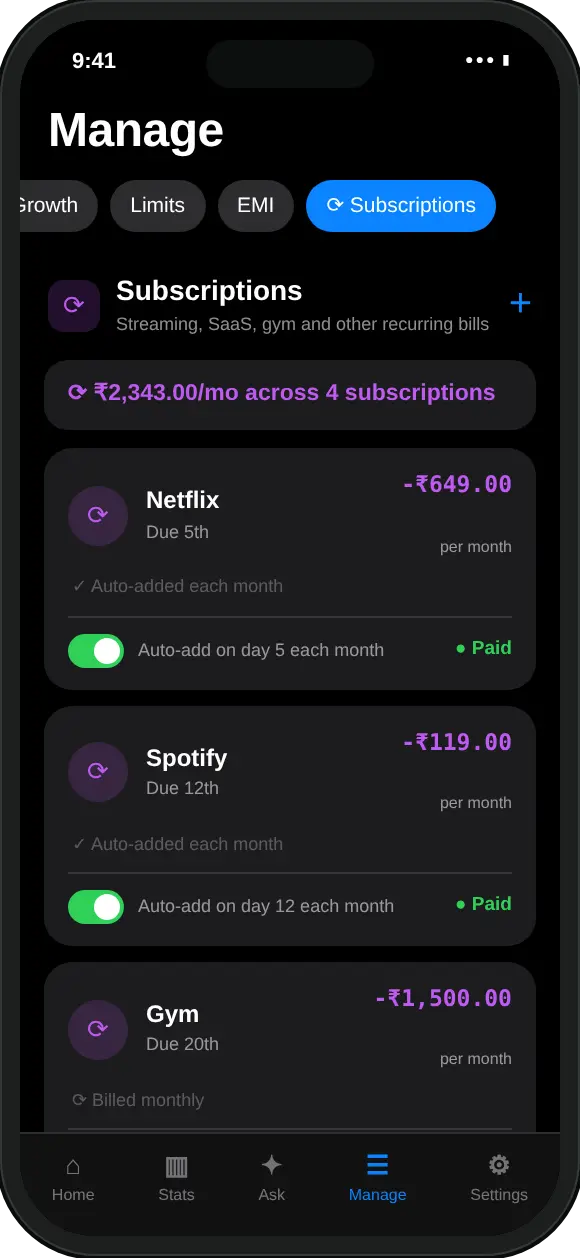
The top of the screen then shows your total, for example “₹2,343.00/mo across 4 subscriptions”. Each row shows the name, the renewal day, the amount per month and whether it has been paid this month.
What do auto-add and Mark paid do?
Auto-add logs the subscription for you on its renewal day each month. Mark paid logs it right now, when you choose.
- Auto-add. On the renewal day, the subscription is added as a transaction under the Subscriptions category. With no renewal day set, it is added on day 1. The row then shows Paid for the month.
- Mark paid. With auto-add off, the row reads “Mark done manually”. Tap Mark paid when the charge goes through. This suits a plan whose amount or day moves around.
- Card subscriptions. Set Paid with to Card and pick the card, and each charge counts towards that card's spend and your combined card limit. When you pay the card bill, log it as a Card payment and it is not counted twice.
- No double counting on import. If you later import a bank statement that includes a subscription you already logged that month, the review list flags it as a possible duplicate before anything is saved.
Subscriptions sit next to EMIs and SIPs as fixed monthly payments. To see them together, read how to track EMIs alongside your daily expenses. To cap the category as a whole, set a category budget on Subscriptions.
How do I stop a renewal I do not want?
Cancel it where you pay for it, before the renewal day, then remove it from your list.
- App Store subscriptions: Settings, your name, Subscriptions, then the plan, then Cancel.
- UPI AutoPay: open the AutoPay section of the UPI app that set it up and pause or cancel the mandate.
- Card payments: cancel in the service's own account settings. If a charge continues after that, your bank can help.
MoneyOS cannot cancel anything for you, because it has no connection to your bank or to any service. Once a plan is cancelled, open it in Manage, Subscriptions and tap Delete subscription. Past payments stay in your history, so last month's totals do not change. Your list never leaves your iPhone; see our privacy policy or our introduction to MoneyOS.
A good habit: once a month, open the list and ask of each row, “Did I use this in the last month?” A row you cannot answer for is usually the one to cancel.
Frequently asked questions
How do I find all my subscriptions?
Go through the last three months of card statements and UPI payment history and look for the same merchant charging the same amount every month. Also check the subscriptions list in your iPhone Settings and the AutoPay section of your UPI app. If your spending is in MoneyOS, the Ask tab shows a subscriptions card once the same merchant has charged the same amount in three or more different months.
Can MoneyOS cancel a subscription for me?
No. MoneyOS has no connection to your bank or to any service, so it cannot cancel anything. You cancel with the service itself, in your iPhone Settings for App Store subscriptions, or in your UPI app for an AutoPay mandate. Then delete it from MoneyOS.
Will MoneyOS remind me before a subscription renews?
No. MoneyOS does not send renewal notifications for subscriptions. Each subscription shows its renewal day, for example Due 5th, and the Subscriptions screen shows which ones are paid this month. The only bill reminders MoneyOS sends are for credit card due dates.
What does auto-add do?
It adds the subscription as a transaction on its renewal day every month, filed under Subscriptions, so you do not have to log it by hand. Without a renewal day it is added on day 1.
Can I track a yearly subscription?
MoneyOS tracks subscriptions as a monthly amount. For a plan you pay once a year, log the payment as a normal expense when it is charged, and keep a calendar reminder for the next renewal date.
Is MoneyOS free?
Yes. The whole app is free, with no subscription, no ads and no in-app purchases. There is no account and no bank login.